
My Stocks 22.80 - App Store
You'll be able to see results in few seconds.
Publisher Description
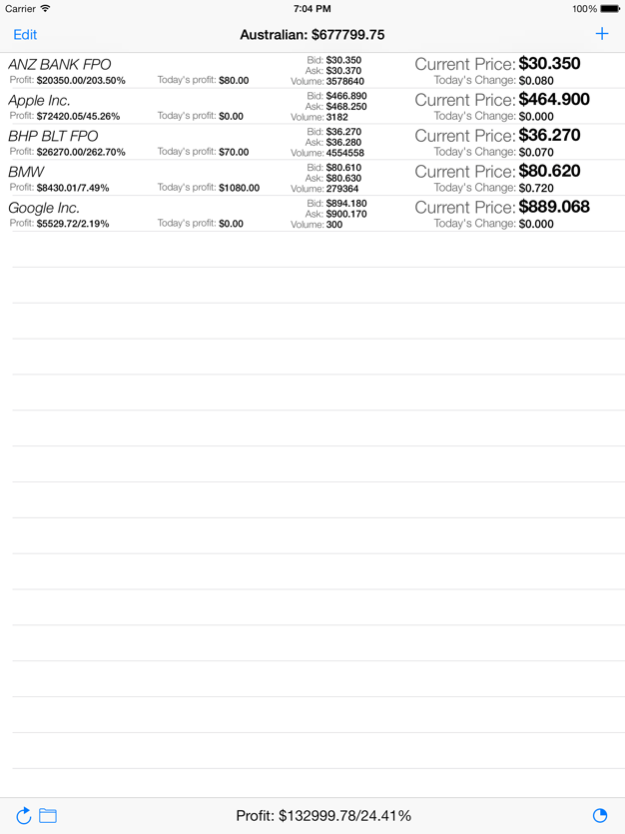
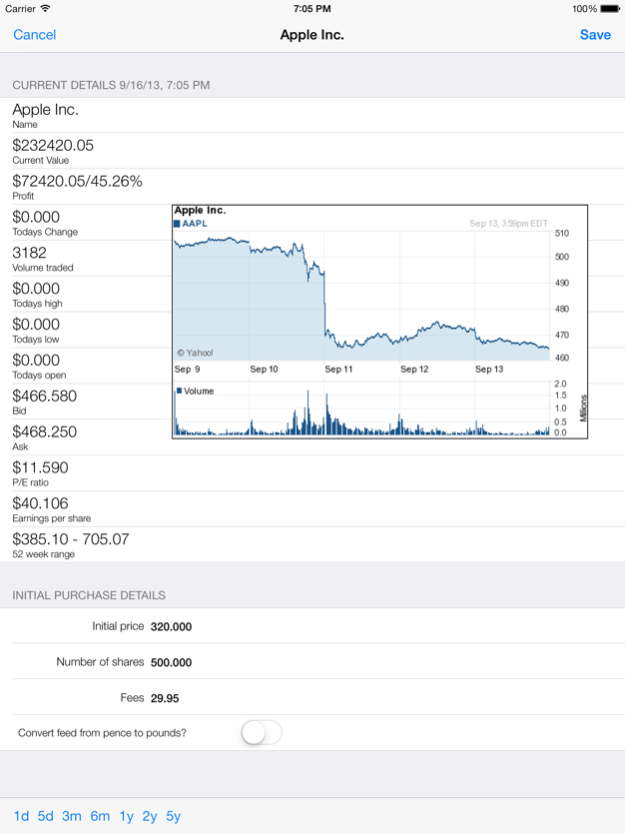
My Stocks 2 is a stock market and portfolio tracking utility for Australian (ASX), New Zealand (NSX), US, London (including those valued in pence), German, Indian and Hong Kong stock exchanges or any yahoo supported stock exchange. It allows you to input the initial cost and number of shares, including fees so you an track the value of your stocks, including profit and losses. You also have the ability to organise your stocks into separate portfolios. For example you can have one for stocks in the US and another for stocks in Australia. You can rename the portfolios so you know which is which and use a separate currency for each portfolio, such as $ or €. Graphs of price history for individual stocks are also available, from 1 day up to 5 years. Universal App with both iPhone and iPad support, so you get two apps for the price of one! Supports Retina display too.
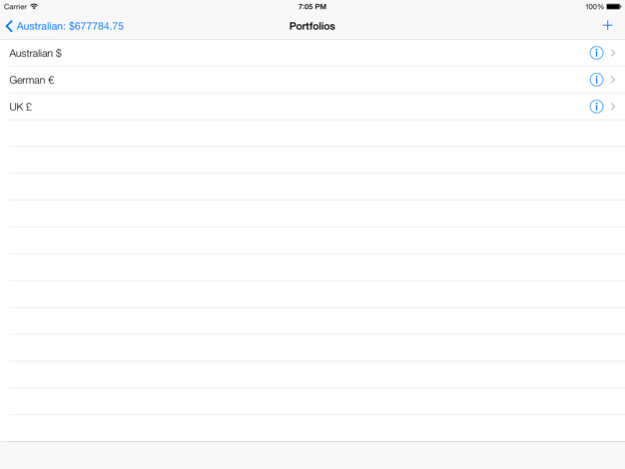
- Support for multiple portfolios, with custom name and currency.
- Support for multiple instances of the same stock - just add the symbol as another stock item.
- Support for user selected currency symbol for currencies that do not use "$".
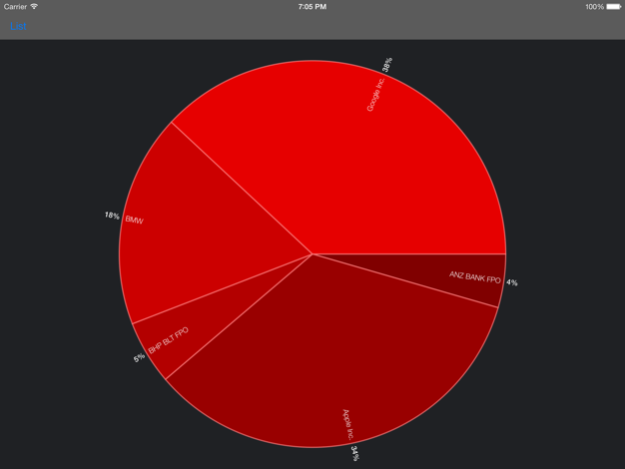
- Pie chart graph giving you a visual breakdown of your portfolio value.
- Ability to add any stock exchange supported by yahoo. US (NYSE/NASDAQ) , German, Australian (ASX), London, Bombay and Hong Kong stock exchanges are supported directly through selection. To use another stock exchange you just need to know the yahoo extension.
- Graphs of stock price history (press on a stock to view details, then rotate device to landscape to view graph in full screen)
Latest pricing data comes from and copyright http://invest.yahoo.com and may be delayed 20 minutes. As this app relies on Yahoo for data which is out of the developers control, the app may stop working without warning.
_______________________________________
************* Instructions ***************
Simply press the "+" button to add a stock, then once added touch a stock in the list to edit number of shares and cost (Note: your device must be rotated in the portrait orientation or you will only see the pricing graph).
To add multiple portfolios simply click the folder icon on the bottom left of screen. To edit a portfolios name and currency, press the arrow button to the right of the portfolio name. To switch between portfolios, press the folder icon and press on up the portfolio you wish to view. Add stocks to the portfolio as above.
You can also change the default currency in the iPhones settings page under "My Stocks 2", this will be set to $ when you first install the app.
Note for London based stocks Yahoo uses both pounds and pence, but does not indicate which is being used. Most are in pounds. If the stock is valued in pence, simply switch the "Convert feed from pence to pounds?" option to on in the stocks details to covert the feed into pounds. Calculations assume your initial pricing info is entered in pounds.
To view graphs, touch a stock in the portfolio list. On iphone rotate to landscape mode to view graph.
_______________________________________
Please email support if you have issues as we can not respond via the AppStore review system. Please follow above instructions to solve most common issues.
mystocks
Dec 4, 2015
Version 2.80
Updated to support iOS 9
bug fixes
About My Stocks 2
The company that develops My Stocks 2 is Evan Hallein. The latest version released by its developer is 2.80.
To install My Stocks 2 on your iOS device, just click the green Continue To App button above to start the installation process. The app is listed on our website since 2015-12-04 and was downloaded 0 times. We have already checked if the download link is safe, however for your own protection we recommend that you scan the downloaded app with your antivirus. Your antivirus may detect the My Stocks 2 as malware if the download link is broken.
How to install My Stocks 2 on your iOS device:
- Click on the Continue To App button on our website. This will redirect you to the App Store.
- Once the My Stocks 2 is shown in the iTunes listing of your iOS device, you can start its download and installation. Tap on the GET button to the right of the app to start downloading it.
- If you are not logged-in the iOS appstore app, you'll be prompted for your your Apple ID and/or password.
- After My Stocks 2 is downloaded, you'll see an INSTALL button to the right. Tap on it to start the actual installation of the iOS app.
- Once installation is finished you can tap on the OPEN button to start it. Its icon will also be added to your device home screen.
Program Details
System requirements
Download information
Pricing
Version History
version 2.80
posted on 2015-12-04
Dec 4, 2015
Version 2.80
Updated to support iOS 9
bug fixes
version 2.80
posted on 2012-01-19
Disclaimer
Official App Store Link
We do not host My Stocks 2 on our servers. We did not scan it for viruses, adware, spyware or other type of malware. This app is hosted by Apple and passed their terms and conditions to be listed there. We recommend caution when installing it.
The App Store link for My Stocks 2 is provided to you by apps112.com without any warranties, representations or guarantees of any kind, so access it at your own risk.
If you have questions regarding this particular app contact the publisher directly. For questions about the functionalities of apps112.com contact us.
